Loading…
Key Concepts
The stack is easier to reason about when you separate four things: application code, wallet code, shared infrastructure, and protocol artifacts.
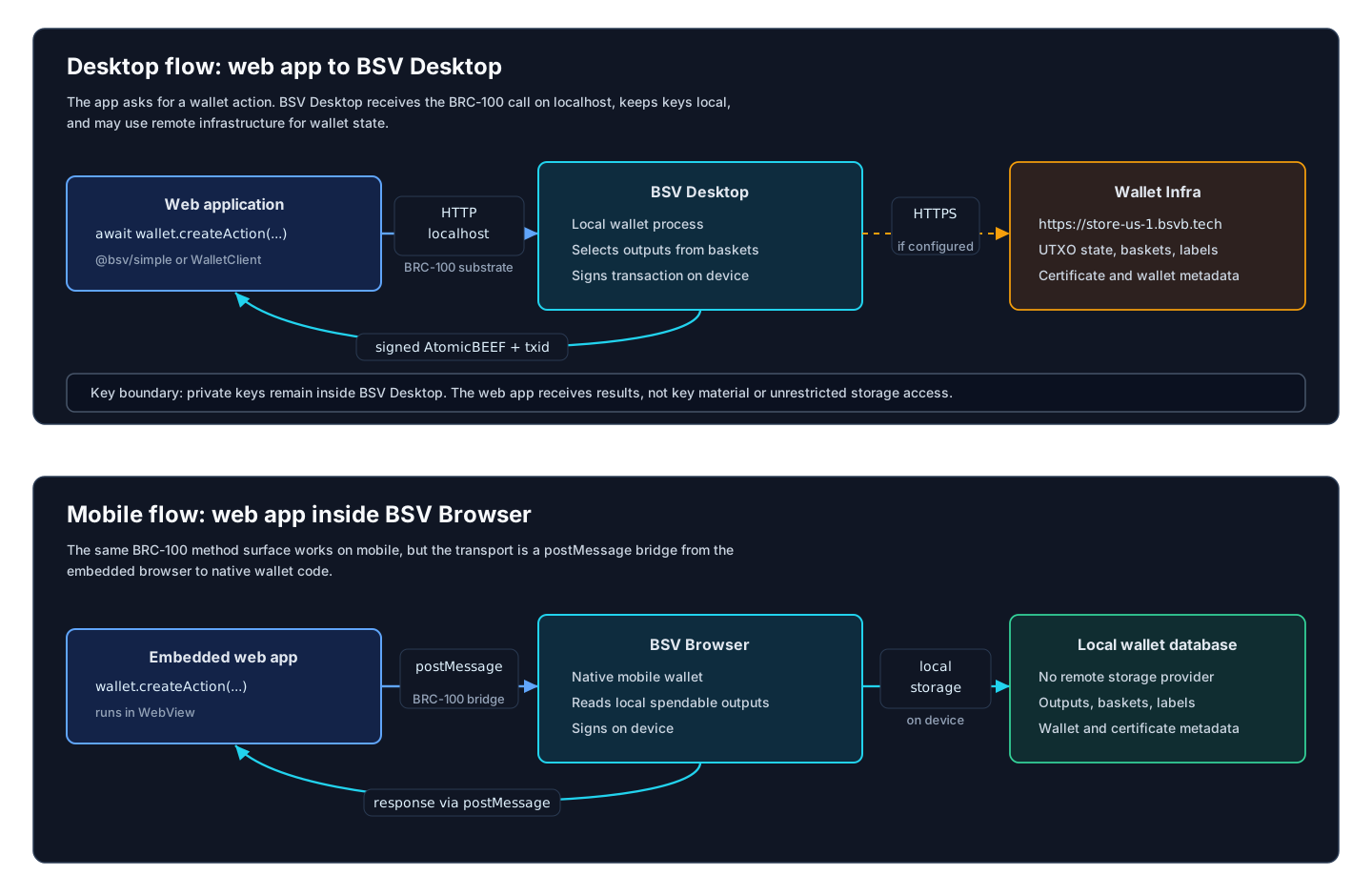
BRC-100 Wallet Boundary
BRC-100 is the wallet-to-application interface. Application code can ask for actions, keys, signatures, encryption, certificates, and output listings without taking custody of private keys.
Two common substrates use the same method surface:
- BSV Desktop: a web app calls a wallet client; the request reaches a localhost wallet server; BSV Desktop selects outputs, signs locally, optionally uses Wallet Infra, and returns the result.
- BSV Browser: the web app runs inside an embedded browser; the request crosses a postMessage bridge into the native mobile wallet; wallet state comes from a local database, signing happens on-device, and the result returns over the bridge.
For a method-level contract, link directly to BRC-100 Wallet Interface. For example: createAction, signAction, internalizeAction, and listOutputs.
Actions, Outputs, Baskets, Labels, and Tags
An Action is a wallet transaction intent. createAction can complete immediately when the wallet can fund, sign, and process everything itself. It can also return a signableTransaction when the app must provide unlocking scripts later via signAction.
An Output is a UTXO. Wallets can place tracked outputs into named baskets. Basket names are how applications and wallet modules organize spendable outputs.
Labels apply to whole actions and are queried with listActions. Tags apply to outputs and are queried with listOutputs.
BEEF and AtomicBEEF
BEEF is the BRC-62 transaction envelope used to move transactions with the context needed for SPV validation. AtomicBEEF is the BRC-95 form used by BRC-100 action results.
In practice:
createActionandsignActionmay returntxas AtomicBEEF bytes.internalizeActionaccepts AtomicBEEF bytes for a transaction the wallet should recognize.listOutputs({ include: 'entire transactions' })can return BEEF for the listed outputs' source transactions.
SDK
@bsv/sdk is the zero-dependency foundation. It provides cryptography, scripts, transactions, BEEF, Merkle paths, BRC-42 key derivation, ARC broadcasting, Chaintracks clients, and BRC-100 interface types.
Use it directly when you are implementing protocols, verifying transactions, building scripts, or writing another wallet implementation.
Simple Helpers
@bsv/simple is the application-level entry point:
@bsv/simple/browserconnects to the user's local wallet and exposes convenience methods such aspay,send,createToken,listTokenDetails,inscribeText, DID helpers, credentials, and overlay helpers.@bsv/simple/servercreates a self-custodial server wallet from a private key and a storage endpoint.
Use these helpers when your goal is to build an app rather than a wallet.
Wallet Toolbox
@bsv/wallet-toolbox is the reference toolkit for wallet developers. It includes:
Wallet, the BRC-100 wallet implementation.WalletStorageManagerand storage providers for SQL, IndexedDB, and remote storage.WalletSigner, key managers, permissions, settings, and logging.Servicesfor broadcast, chain tracking, Merkle proof acquisition, and network lookups.Monitortasks that review wallet state, proofs, pending transactions, and change outputs.
Wallet builders compose these pieces into products such as BSV Desktop or BSV Browser. App developers usually consume the resulting BRC-100 wallet through WalletClient or @bsv/simple.
Infrastructure
Infrastructure components are deployable services, not npm packages:
- Wallet Infra stores wallet state, outputs, baskets, labels, and certificate metadata for clients that use remote storage.
- Message Box stores encrypted peer-to-peer messages until recipients retrieve and acknowledge them.
- Overlay Server runs topic managers and lookup services for shared on-chain context.
- UHRP servers host or resolve content-addressed files.
- WAB supports wallet authentication and recovery flows.
- Chaintracks Server provides block headers and Merkle root data for SPV.
The public BSVA deployment naming pattern is documented in Infrastructure.
Conformance
The TypeScript stack is the reference implementation for cross-language compatibility. Current vectors live in conformance/vectors/, with corpus metadata in conformance/META.json.
Use Vector Catalog to see what is covered today, and TypeScript Runner to validate a corpus locally.