Loading…
BRC-100 Wallet Interface
BRC-100 is the boundary between application code and wallet code. Apps describe what they want; wallets decide how to select outputs, apply permissions, derive keys, sign, broadcast, and track state.
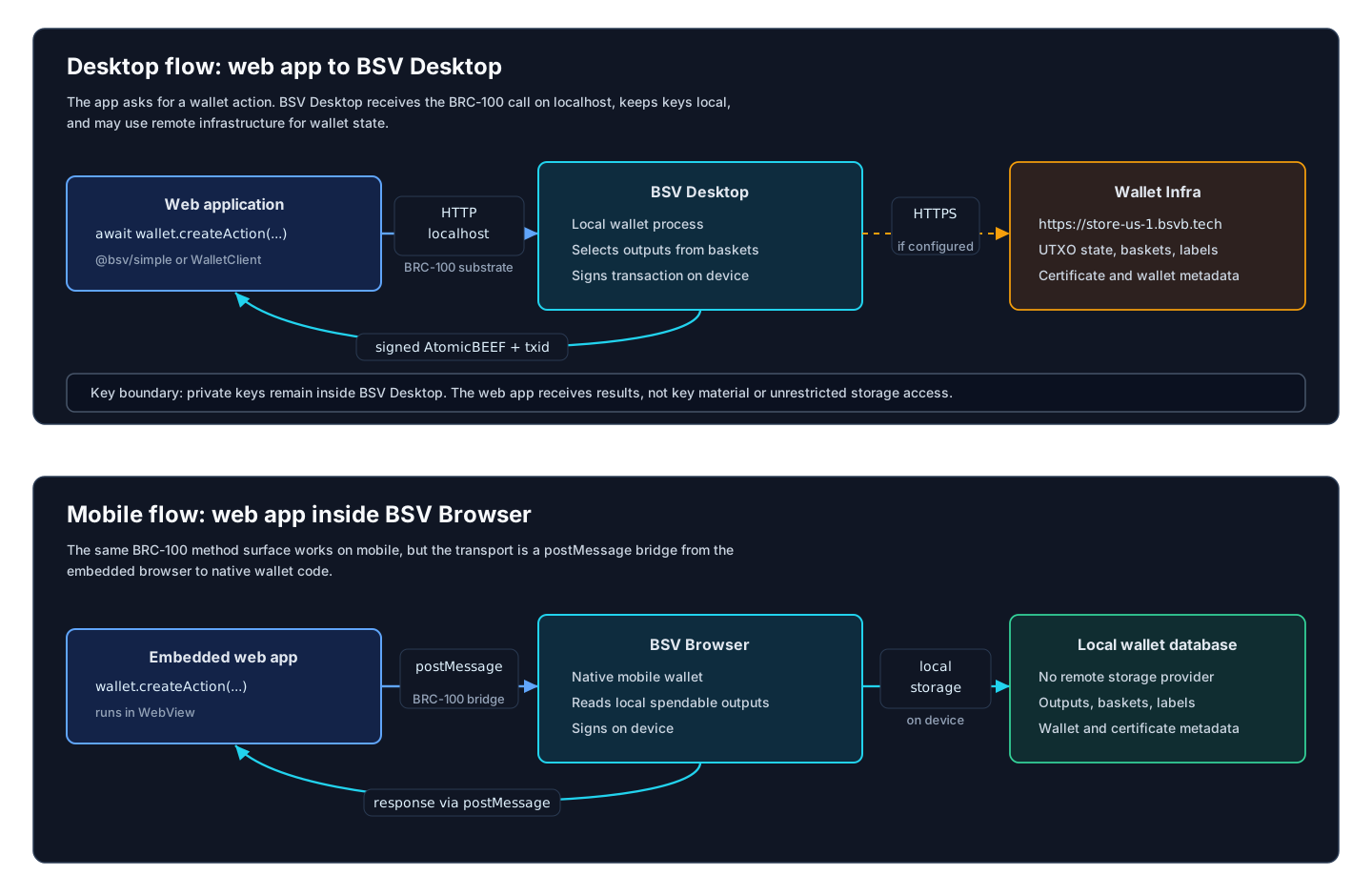
Why This Boundary Exists
Without BRC-100, every app would need custom wallet integrations and every wallet would need custom app adapters. BRC-100 gives both sides one stable contract:
- Apps can call
wallet.createAction,wallet.getPublicKey,wallet.encrypt, and other methods without learning a specific wallet product. - Wallets can implement one interface and expose it over localhost, postMessage, JSON APIs, native bridges, or in-process objects.
- Other language implementations can target the same method shapes and test against the same conformance vectors.
Recovery boundary
BRC-100 standardizes the application/wallet interface; implementing it does not supply a complete disaster-recovery product. The wallet must preserve both recoverable keys and its records/derivation metadata. A chain rescan, an OTP or a key-manager snapshot is not a replacement for wallet-data recovery.
Use Wallet backup and recovery for responsibilities and the BRC-38/39 guide for per-user data portability. Applications should link to their wallet's recovery controls without collecting wallet secrets.
Desktop Flow
On desktop, a web app uses @bsv/simple/browser or WalletClient from @bsv/sdk.
- The app calls a BRC-100 method such as
createAction. WalletClientfinds the available wallet substrate.- BSV Desktop receives the request over a localhost wallet server.
- The wallet may call Wallet Infra, for example
https://store-us-1.bsvb.tech, to read and update wallet state. - Keys remain in the desktop wallet process.
- The wallet returns the action result, such as
txid,tx,noSendChange,sendWithResults, orsignableTransaction.
Mobile Flow
On mobile, BSV Browser embeds the web app and exposes the same method surface through a bridge.
- The app calls the same BRC-100 method.
- The browser WebView sends the request to native code over
postMessage. - The native wallet selects outputs from its local database and signs on the device.
- The wallet may still use network services such as ARC or Chaintracks for broadcast, headers, and proofs.
- The result returns to the web app through the bridge.
The application does not need separate business logic for desktop and mobile if it stays on the BRC-100 interface.
Method Groups
| Group | Purpose | Method reference |
|---|---|---|
| Actions | Create, sign, abort, list, and internalize transactions. | createAction, signAction, internalizeAction |
| Outputs | Query and relinquish tracked outputs in baskets. | listOutputs, relinquishOutput |
| Keys and crypto | Derive public keys, encrypt/decrypt, HMAC, signatures, key linkage. | getPublicKey, encrypt, createSignature |
| Certificates | Acquire, list, prove, relinquish, and discover identity certificates. | acquireCertificate, proveCertificate |
| Wallet state | Authentication, chain height, headers, network, version. | getHeight, getVersion |
Action Lifecycle
createAction has two common outcomes:
| Outcome | What the app receives | What happens next |
|---|---|---|
| Immediate action | txid and/or tx | Wallet had enough information to fund, sign, and process the transaction. |
| Signable action | signableTransaction: { tx, reference } | App signs specific inputs or creates unlocking scripts, then calls signAction({ reference, spends }). |
noSend and sendWith support chained batches. A wallet can create several actions without broadcasting them, pass change forward through noSendChange, and later send them together.
For the full lifecycle — every storage call each method makes, the transaction and output state machines, and where the TypeScript and Go implementations differ — see Wallet UTXO Lifecycle.
Labels vs Tags
| Concept | Scope | Used by |
|---|---|---|
| Labels | Whole action/transaction | createAction({ labels }), listActions({ labels }) |
| Tags | Specific output | createAction({ outputs: [{ tags }] }), listOutputs({ tags }) |
| Baskets | Named output containers | listOutputs({ basket }), internalizeAction basket insertions |
Do not use labels as output tags or tags as action labels. They are different indexes.
Implementation Sources
- Human-readable method reference: BRC-100 Wallet Interface
- Machine-readable schema:
specs/sdk/brc-100-wallet.json - Type source:
packages/sdk/src/wallet/Wallet.interfaces.ts - Reference implementation:
packages/wallet/wallet-toolbox/src/Wallet.ts - Wallet examples:
packages/wallet/wallet-toolbox-examples/src/