🌱 Seeder Command
Index
- Description
- Functionality
- Data Model
- Technology
- Directory Structure and Main Files
- How to Run
- Configuration Options
1. Description
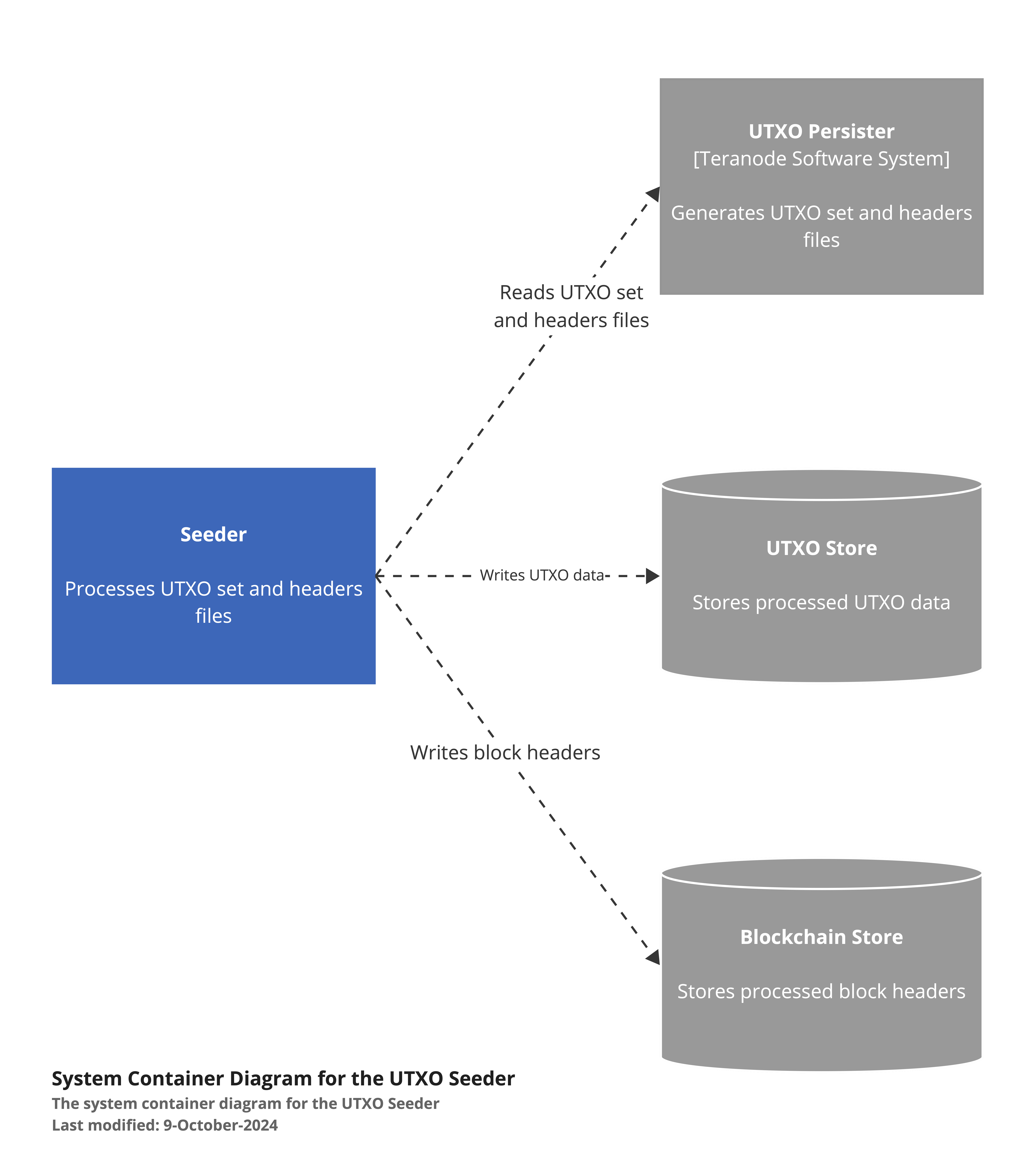
The Seeder is a command-line tool designed to populate the UTXO store with data up to and including a specific block. It reads a UTXO set (as produced by the UTXO Persister service) and writes all the necessary records to the configured UTXO and Blockchain storage system (e.g., Aerospike and Postgres). This tool is crucial for initializing or updating the UTXO state of a Bitcoin node.
Key features:
- Processes block headers and stores them in the blockchain store.
- Reads and processes UTXO data from a file.
- Populates the UTXO store with processed data.
- Supports parallel processing of UTXOs for improved performance.
- Provides options to skip header or UTXO processing if needed.
2. Functionality
2.1 Command Initialization
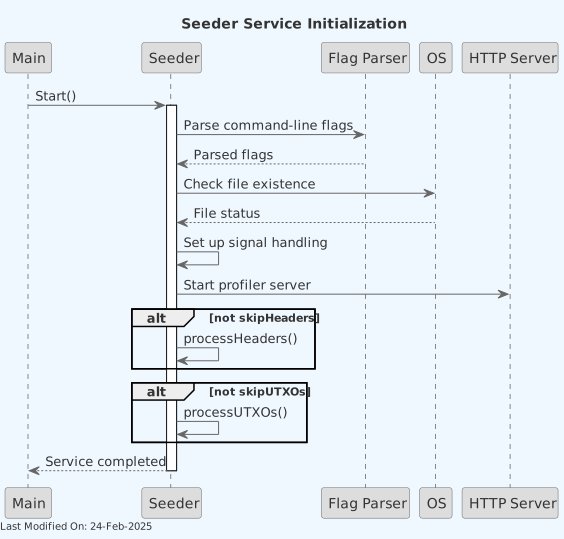
- The command starts by parsing command-line flags to determine the input directory, target hash, and processing options.
- It verifies the existence of required input files (headers and UTXO set).
- The command sets up signal handling for graceful shutdown.
- An HTTP server is started for profiling purposes.
2.2 Processing Headers
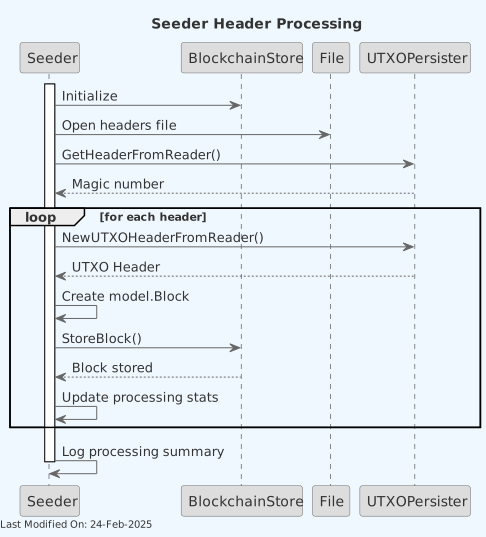
If header processing is not skipped:
- The command opens the headers file and verifies its magic number.
- It reads headers sequentially from the file.
-
For each header:
- A
model.Blockobject is created. - The block is stored in the blockchain store.
- The command keeps track of the number of headers processed and total transaction count.
- A
2.3 Processing UTXOs
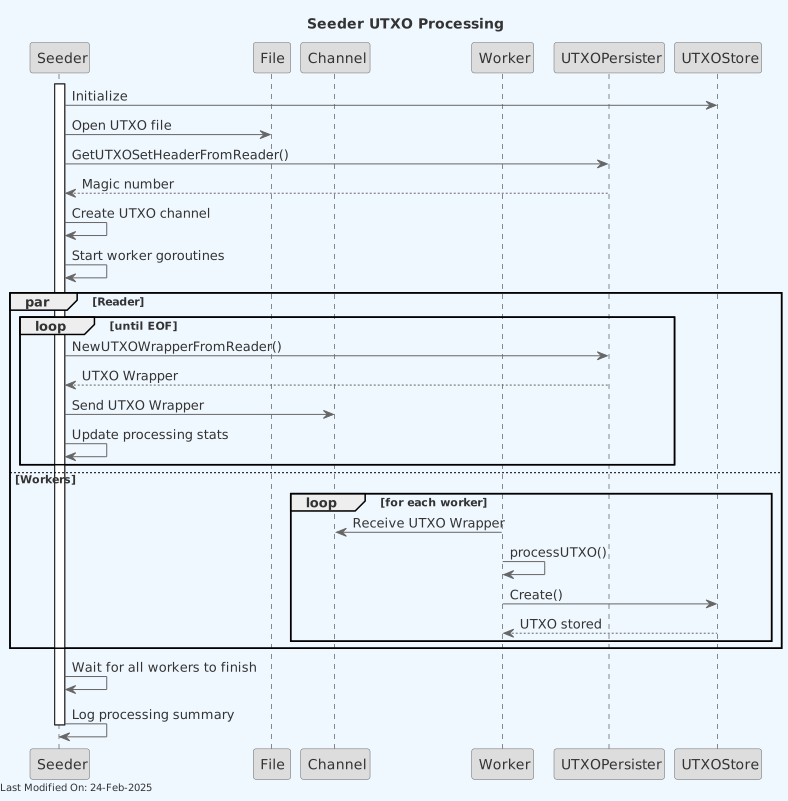
If UTXO processing is not skipped:
- The service initializes a connection to the UTXO store.
- The UTXO file is opened and its header is verified.
- The file is imported in two concurrent passes, each with its own reader,
channel and worker goroutines: one creates the transactions that fit a
single UTXO store record, the other those spanning multiple records
(highest unspent output index at or above
utxostore_utxoBatchSize), which take a much slower create path. The first error in either pass stops both. - Each pass's reader cuts the file into raw records and sends only the records of its kind to its workers; an output index no valid transaction can have fails the import.
-
Worker goroutines decode records in parallel:
- Each record is converted to a Bitcoin transaction format.
- The transaction is stored in the UTXO store.
- Each pass counts every transaction and UTXO in the file and checks the totals against the file's footer, so a truncated file fails the import.
3. Data Model
The Seeder works with the following key data structures:
-
Block Header: Represented by
utxopersister.BlockIndex, containing:- Block header information
- Transaction count
- Block height
-
UTXO Wrapper: Represented by
utxopersister.UTXOWrapper, containing:- Transaction ID
- Block height
- Coinbase flag
- List of UTXOs
-
UTXO: Represented within the UTXO Wrapper, containing:
- Output index
- Value (in satoshis)
- Locking script
The service reads these structures from input files and converts them to the format required by the blockchain and UTXO stores.
4. Technology
-
Go (Golang): The primary programming language.
-
BSV Blockchain Libraries:
github.com/bsv-blockchain/go-bt/v2: For handling Bitcoin transactions and scripts.-
Custom TERANODE Libraries:
-
github.com/bsv-blockchain/teranode: For blockchain and UTXO store operations, error handling, and logging.
-
Concurrent Processing:
golang.org/x/sync/errgroup: For managing concurrent UTXO processing.
-
Configuration Management:
github.com/ordishs/gocore: For reading configuration values.
5. Directory Structure and Main Files
./cmd/seeder/
│
├── seeder.go
│   Entry point for the Seeder command-line tool.
│
├── seeder/
│   ├── start.go
│   │   Main implementation of the Seeder service, including
│   │   command-line parsing, header processing, and UTXO processing.
│   │
│   └── README.md
│       Documentation for the Seeder service.
6. How to Run
To run the Seeder command, use the following command:
teranode-cli seeder -inputDir <folder> -hash <hash> [-skipHeaders] [-skipUTXOs] [-force] [-skipChecksum]
Options:
-inputDir: Specifies the input directory containing UTXO set and headers files.-hash: Hash of the UTXO set / headers to process.-skipHeaders: (Optional) Skip processing of headers.-skipUTXOs: (Optional) Skip processing of UTXOs.-force: (Optional) Process even iflastProcessed.dator BlockAssembler state already exists.-skipChecksum: (Optional) Skip checksum verification (see below). Only for callers that have already verified the files against their sidecars.
Checksum verification
Before reading the headers file and/or the UTXO-set file, the seeder checks
for a <file>.sha256 checksum sidecar next to it — the same format the UTXO
Persister's blob file store, and bitcointoutxoset, write alongside every
snapshot: a hex-encoded SHA-256 digest, optionally followed by the snapshot's
filename.
- If a sidecar is present and matches, the import proceeds.
- If a sidecar is present and does not match (wrong checksum, or a filename field naming a different snapshot), the seeder refuses to import and returns an error — a corrupted-but-otherwise-well-formed snapshot must never be silently seeded.
- If no sidecar is present, the import proceeds with only a warning logged; mandating a sidecar for every possible snapshot source isn't realistic, so this is not a fatal condition.
This applies to the headers file even when -skipHeaders is set: the UTXO
pass still reads the headers file back to recover coinbase inputs, so it is
verified whenever it will be consumed, not only when the header-import pass
itself runs.
Verification reads each file in full (7m38s for a 569 GB mainnet UTXO set).
A caller that has already verified the same files, such as a fetch script
that checks the sidecars after download, can pass -skipChecksum to avoid
reading them twice; the seeder logs a warning when it does. Checking during
the import instead is not offered: a mismatch found partway through would
leave corrupt records in the UTXO store that a re-run keeps as already
present.
This check is a defense against transfer/storage corruption, not tampering: the sidecar itself is unauthenticated, so it cannot detect a snapshot and its sidecar being modified together. There is no flag to make the sidecar mandatory; a missing sidecar always falls back to a warning.
7. Configuration Options
The Seeder uses various configuration options, which can be set through a configuration system:
blockchain_store: URL for the blockchain store.utxostore: URL for the UTXO store.channelSize: Buffer between each pass's reader and its workers (default: 1000).workerCount: Worker goroutines in the single-record pass (default: 16384, range 1 to 1,048,576). Each blocks until its create is written, so this is the number of transactions in flight; it must comfortably exceedutxostore_storeBatcherSize.multiRecordWorkerCount: Worker goroutines in the multi-record pass (range 1 to 1,048,576; default:seeder_externalStoreConcurrency, or 1024 when that is 0 or less).seeder_externalStoreConcurrency: Replacesutxostore_externalStoreConcurrencyfor the seeder run (default: 256; 0 or less means unlimited).seeder_externalStoreFsyncMode: fsync mode for afile://external store whose URL does not setfsyncMode(default:data). Seecmd/seeder/README.mdfor the durability trade-off ofnone.skipStore: Boolean flag to skip storing UTXOs (for testing purposes).
cmd/seeder/README.md has the same settings with more detail.
8. Known Limitations
Missing Miner Information in V1 Format
Current Behavior (V1 format - U-H-1.0):
Blocks seeded using the V1 UTXO headers format will not have miner information populated in the blockchain store. This is because:
- The V1 headers file format only contains:
- Block hash (32 bytes)
- Block height (4 bytes)
- Transaction count (8 bytes)
-
Block header (80 bytes)
-
Miner information is extracted from the coinbase transaction using
util.ExtractCoinbaseMiner() -
V1 format does not include coinbase transactions in the headers file
Result: Seeded blocks will show empty miner information when queried through the Asset Server or blockchain APIs.
Resolution:
The V2 format (U-H-2.0) includes coinbase transactions in the headers file and will properly populate miner information during seeding. This update is available in commit bb10c7d12 and will be merged to main in a future release.
The V2 format:
- Maintains backwards compatibility with V1 headers files
- Includes the full coinbase transaction for each block
- Allows the seeder to extract and store miner information correctly
- Supports both legacy V1 imports and new V2 exports
Workaround:
For existing deployments using V1 format seeds:
- Blocks mined after the seeding point will have proper miner information
- Historical seeded blocks will continue to show empty miner data until re-seeded with V2 format
- This does not affect blockchain validation or UTXO correctness