🗂️️ State Management in Teranode
- Introduction
- State Machine in Teranode
- Functionality
- 3.1. State Machine Initialization
- 3.2. Accessing the State Machine
- 3.2.1. Access via Command-Line Interface
- 3.2.2. Access via HTTP
- 3.2.3. Access via gRPC
- 3.3. State Machine States
- 3.3.1. FSM: Idle State
- 3.3.2. FSM: Running State
- 3.3.3. FSM: Catching Blocks State
- 3.4. State Machine Events
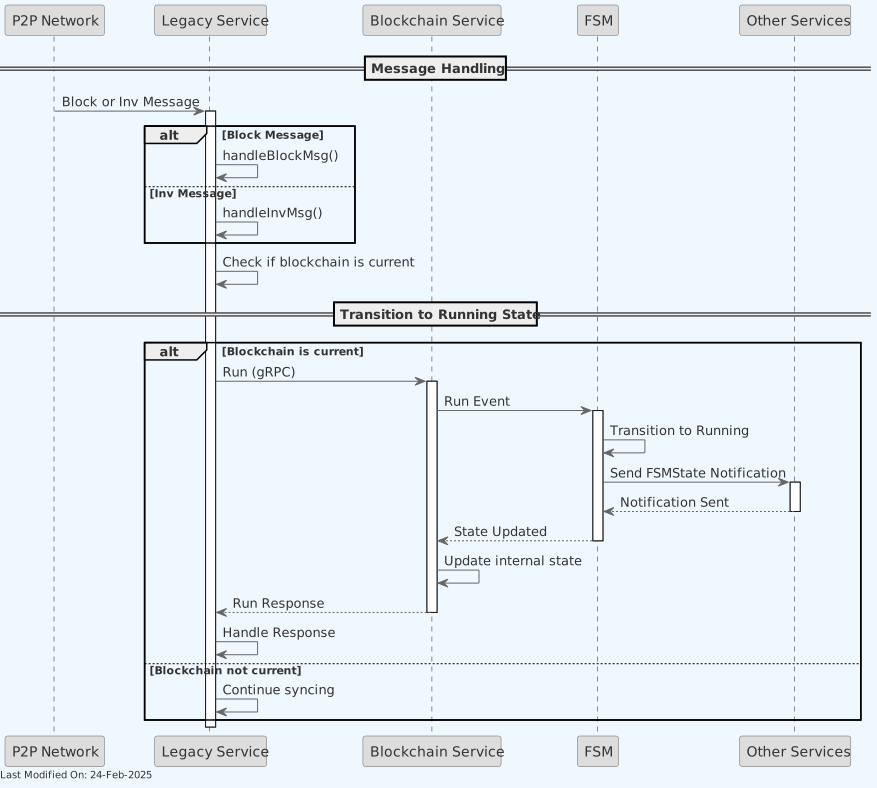
- 3.4.1. FSM Event: Run
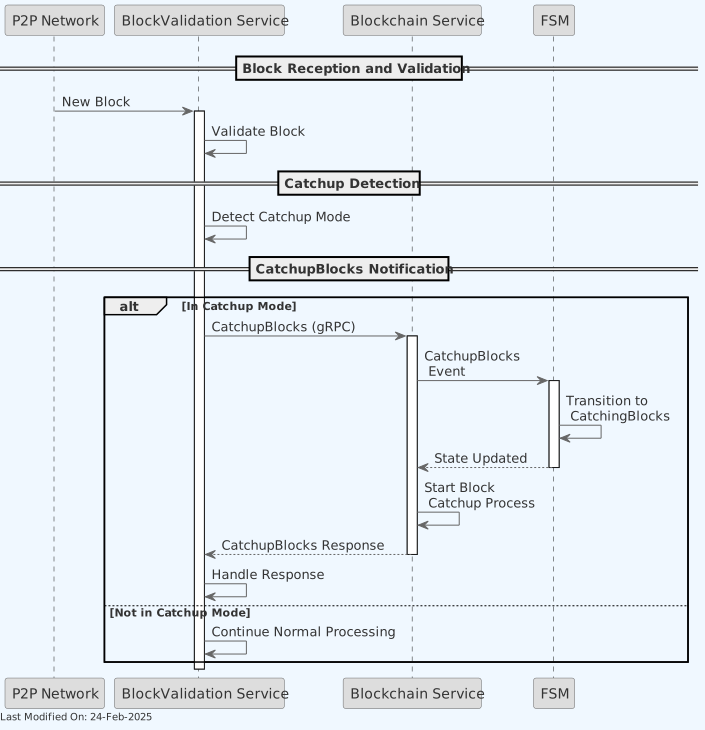
- 3.4.2. FSM Event: Catch up Blocks
- 3.4.3. FSM Event: Stop
- 3.5. Waiting on State Machine Transitions
- 3.6. Health Check Status Codes
- Other Resources
1. Introduction
A Finite State Machine is a model used in computer science that describes a system which can be in one of a finite number of states at any given time. The machine can transition between these predefined states based on inputs or conditions (an "event").
Finite State Machines:
- have a finite set of states.
- can only be in one state at a time.
- transition between states based on inputs or events.
- have a defined initial state.
- may have one or more final states.
2. State Machine in Teranode
The Teranode blockchain service uses a Finite State Machine (FSM) to manage the various states and transitions of the node. The FSM is responsible for controlling the node's behavior based on the current state and incoming events.
The FSM has the following states:
- Idle
- Running
- CatchingBlocks
The FSM responds to the following events:
- Run
- CatchupBlocks
- Stop
The diagram below represents the relationships between the states and events in the FSM (as defined in services/blockchain/fsm.go):

The FSM handles the following state transitions:
- Run: Transitions to Running from Idle or CatchingBlocks
- CatchupBlocks: Transitions to CatchingBlocks from Running or Idle
- Stop: Transitions to Idle from Running or CatchingBlocks
Teranode provides a visualizer tool to generate and visualize the state machine diagram. To run the visualizer, use the command go run services/blockchain/fsm_visualizer/main.go. The generated docs/state-machine.diagram.md can be visualized using https://mermaid.live/.
3. Functionality
3.1. State Machine Initialization
As part of initialization, the Blockchain service normally restores the FSM
state it last persisted. A node with no persisted state uses
blockchain_initializeNodeInState: an empty value means CatchingBlocks,
while production operator and docker.m contexts default it to Idle so a
seed can be inspected before catch-up. Uppercase values are required. Validation
applies only when no FSM state is persisted; invalid values then abort startup.
The test-only local start-state override takes precedence. Otherwise, a
configured fresh-node Running state must pass the active network's checkpoint
gate; below-checkpoint configured Running aborts startup without fallback.
A persisted Running state with a successfully read tip below the checkpoint
is persisted and resumed as CatchingBlocks instead. A tip-read failure or
missing tip metadata aborts startup and leaves the persisted state unchanged.
Unrecognized persisted state names likewise abort without writes; only the
known retired LEGACYSYNCING name is migrated automatically.
3.2. Accessing the State Machine
3.2.1. Access via Command-Line Interface (Recommended)
The Teranode Command-Line Interface (teranode-cli) provides the most direct and recommended approach for interacting with the State Machine. The CLI abstracts the underlying API calls and offers a straightforward interface for both operators and developers.
The CLI provides two primary commands for FSM interaction:
- getfsmstate - Queries and displays the current state of the FSM
- setfsmstate - Changes the FSM state by sending the appropriate event
These commands interface with the same underlying mechanisms as the gRPC methods, but provide a more user-friendly experience with appropriate validation and feedback.
3.2.2. Access via HTTP (Asset Server)
The Asset Server provides a RESTful HTTP interface to the State Machine, offering a web-friendly approach to FSM interaction. This interface is particularly useful for web applications and administrative dashboards that need to monitor or control node state.
The Asset Server exposes the following endpoints for FSM interaction:
- GET /api/v1/fsm/state - Retrieves the current FSM state
- POST /api/v1/fsm/state - Sends a custom event to the FSM
- GET /api/v1/fsm/events - Lists all available FSM events
- GET /api/v1/fsm/states - Lists all possible FSM states
These HTTP endpoints provide the same functionality as the CLI and gRPC methods but with a RESTful interface that can be accessed using standard HTTP clients.
3.2.3. Access via gRPC
The Blockchain service also exposes the following gRPC methods to interact with the FSM programmatically:
- GetFSMCurrentState - Returns the current state of the FSM
- SendFSMEvent - Sends an event to the FSM to trigger a state transition
- Run - Transitions the FSM to the Running state (delegates on the SendFSMEvent method)
- CatchUpBlocks - Transitions the FSM to the CatchingBlocks state (delegates on the SendFSMEvent method)
- Idle - Transitions the FSM to the Idle state by sending the STOP event (delegates on the SendFSMEvent method)
3.3. State Machine States
3.3.1. FSM: Idle State
A node reaches Idle by being stopped from Running or CatchingBlocks, by restoring persisted
Idle, or by starting fresh under a context configured to park there (production
deployments do; see section 3.1). In this state:
- No operations are permitted
- All services are inactive
- The node is not participating in the network in any way
- Must be manually triggered to transition to another state
Allowed Operations in Idle State:
- ❌ Process external transactions
- ❌ Legacy relay transactions
- ❌ Queue subtrees
- ❌ Process subtrees
- ❌ Queue blocks
- ❌ Process blocks
- ❌ Relay blocks
- ❌ Speedy process blocks
- ❌ Create subtrees (or propagate them)
- ❌ Create blocks (mine candidates)
Services wait for the FSM to leave Idle before starting their operations — any
non-Idle state, including CatchingBlocks, releases them (see section 3.5). As
such, a node that boots into Idle sees no activity until it leaves Idle.
The node can also return to Idle from Running or CatchingBlocks, but only on a manual / external request. Services that have already started keep running; Idle records the operator's intent and blocks automatic promotion, it is not a drain barrier. In particular, a STOP from CatchingBlocks does not cancel the catchup batch in progress: it keeps validating blocks under Idle and its final promotion to Running is refused. The catchup safeguards (no block-assembly feeding, no peer-subtree validation, no rejected-transaction or invalid-subtree publishing, pruner SkipDuringCatchup) apply in every state except Running, so they stay in force under Idle. In legacy sync mode, block download is not FSM-gated and continues. Stop the services before destructive recovery such as rewindblockchain.
3.3.2. FSM: Running State
The Running state represents the node actively participating in the network. In this state:
Allowed Operations in Running State:
- ✅ Process external transactions
- ✅ Legacy relay transactions
- ✅ Queue subtrees
- ✅ Process subtrees
- ✅ Queue blocks
- ✅ Process blocks
- ✅ Relay blocks
- ❌ Speedy process blocks
- ✅ Create subtrees (or propagate them)
- ✅ Create blocks (mine candidates)
Once the FSM transitions to the Running state, all services will start their normal operations.
The Block Assembler will only mine blocks when the node is in the Running state. The Block Assembler will never mine blocks under any other node state.
3.3.3. FSM: Catching Blocks State
The CatchingBlocks state represents the node catching up on blocks. It is entered
by BlockValidation when a running node finds it has fallen behind the network; at
startup when selected as the fresh-node boot state (see section 3.1); when an
unsafe persisted Running state is recovered; or through an explicit
CATCHUPBLOCKS event from Idle. In this state:
Allowed Operations in Catching Blocks State:
- ✅ Process external transactions
- ✅ Legacy relay transactions
- ✅ Queue subtrees
- ✅ Process subtrees
- ✅ Queue blocks
- ✅ Process blocks
- ✅ Relay blocks
- ❌ Speedy process blocks
- ❌ Create subtrees (or propagate them)
- ❌ Create blocks (mine candidates)
Outbound P2P gossip is gated per FSM state by a declarative allow-list
(outboundTopicsAllowed in services/p2p/publish_gate.go): in Running the
node may publish block, subtree, rejected-tx, and node_status messages; in
CatchingBlocks and Idle it publishes only node_status (so peers can track
its height). Idle is deliberately restrictive because it doubles as the
blockchain client's safety fallback: when the FSM state cannot be fetched or
the heartbeat is lost, the client caches Idle and reports it with no error,
so a degraded blockchain client reads as Idle and gossip stops (only
node_status keeps flowing) until the state is re-fetched. An idle node must
not participate in the network in any case. States unknown to the
allow-list (e.g. from a newer blockchain service) also fall back to
node_status-only. Suppressed publishes are counted in the
teranode_p2p_publish_blocked_total metric.
Error Handling in Catching Blocks State
When an error occurs during the catchup process, the FSM behavior has been updated to maintain state consistency:

Key points about error handling:
- State Persistence: When an error occurs during catchup (e.g., validation failure, network error), the FSM remains in the
CatchingBlocksstate - No Automatic Reversion: The FSM does not automatically revert to the
Runningstate on error - Explicit Recovery Required: Recovery from errors requires either:
- Manual retry of the catchup process
- Automatic retry mechanism (if configured)
- Explicit state reset via operator intervention
- Consistency: This behavior prevents inconsistent state transitions and ensures the node doesn't incorrectly resume normal operations while catchup is incomplete
3.4. State Machine Events
3.4.1. FSM Event: Run
The gRPC Run method triggers the FSM to transition to the Running state. This event is used to indicate that the node is ready to start participating in the network and processing transactions and blocks.
3.4.2. FSM Event: Catch up Blocks
The gRPC CatchUpBlocks method triggers the FSM to transition to the CatchingBlocks state. This event is used to indicate that the node is catching up on blocks and needs to process the latest blocks before resuming full operations.
3.4.3. FSM Event: Stop
The gRPC Idle method sends a Stop event to the FSM, which triggers a transition to the Idle state. This event is used to stop the node from participating in the network and halt all operations.
This method is not currently used.
3.5. Waiting on State Machine Transitions
Through internal helper methods, services can wait for the FSM to transition out of the Idle state before proceeding with their operations. This method is used by various services to ensure that the node is in the correct state before starting their activities.
The method blocks until the FSM transitions from the Idle state to any non-Idle state (such as Running or CatchingBlocks) or until a timeout occurs. This ensures that services are synchronized with the node's state changes and can respond accordingly.
The following services wait for the FSM to transition from the Idle state before starting their operations:
- Asset Server
- Block Persister
- Block Validation
- Legacy P2P Gateway
- P2P
- Propagation
- Pruner
- Subtree Validation
- UTXO Persister
- Validator
3.6. Health Check Status Codes
Each service's own /health HTTP route does not consult the FSM. Propagation's (services/propagation/Server.go) is a hardcoded 200; the asset server's (services/asset/httpimpl/http.go) returns its repository's readiness JSON with a 200 status code, and since health.CheckAll never returns a non-nil error the 500 branch there is unreachable, so the body can report "status": "503" under a 200 code. The FSM state is checked by the daemon's aggregated health server instead: the daemon (daemon/daemon.go) starts a separate HTTP listener on HealthCheckHTTPListenAddress (default :8000) that exposes /health/readiness and /health/liveness for every service running in the process, plus a legacy /health alias of /health/readiness. Thirteen services register CheckFSM (services/blockchain/fsm.go) as one of their readiness checks — notably not the blockchain service itself, which owns the FSM and builds its readiness set from the gRPC server, HTTP server, Kafka and BlockchainStore only (services/blockchain/Server.go), so a blockchain pod's /health/readiness has no FSM row at all. health.CheckGRPCServerWithSettings (a plain TCP/gRPC connectivity probe, not a gRPC health-check protocol implementation) may be registered alongside it. The same readiness set is also reachable over gRPC, for some services: eight servers implement a HealthGRPC RPC and answer it by calling their own Health(ctx, false), and seven of those eight (alert, block assembly, block validation, propagation, pruner, subtree validation, validator) register CheckFSM, so their gRPC health response folds in the FSM state exactly as /health/readiness does; asset, block persister, legacy, p2p, RPC and UTXO persister register the check but expose no HealthGRPC, and the blockchain service is the reverse — it has HealthGRPC but does not register the check for itself. /health/liveness reaches every service: the daemon's handler calls ServiceManager.HealthHandler(ctx, true), which loops over all services and invokes each one's Health(ctx, true). The short-circuit is inside those implementations — on the liveness path a service returns health.CheckAll(ctx, checkLiveness, nil) with no checks, so the FSM check is never built or run and the FSM state never affects liveness. CheckFSM maps the FSM state to an HTTP status code as follows:
| FSM State | HTTP Status | Meaning |
|---|---|---|
Idle |
200 StatusOK |
Healthy, but not yet processing transactions/blocks. |
Running |
200 StatusOK |
Healthy and actively participating in the network. |
CatchingBlocks |
200 StatusOK |
Healthy and catching up on blocks. |
| Unknown/unlisted | 503 StatusServiceUnavailable |
Unrecognized FSM state, or the FSM state query itself failed. |
The mapping above is for the FSM check in isolation: /health/readiness runs all of a service's registered health.Check entries through health.CheckAll (util/health/health.go), and the endpoint returns 503 if any check fails, so the FSM state is only one contributor to the overall status.
The state a non-blockchain service reports is also normally the value its blockchain client last received over the notification subscription, not a fresh query — Client.GetFSMCurrentState (services/blockchain/Client.go) returns the cached value whenever it is populated, and a live query happens only in the window before that cache is first filled. If the subscription drops (no heartbeat, or a stale one) the client deliberately pins the cache to IDLE, and a failed post-reconnect refetch does the same "for safety". So Idle + 200 from this check can also mean "lost contact with the blockchain service" rather than "not yet sent Run" — it is the co-registered BlockchainClient check, not this one, that turns that case into a 503 on /health/readiness.
Note that Idle reports 200, not 503: an idle node is healthy, just not yet running. CheckFSM takes a checkLiveness parameter but ignores it, since it is registered as a readiness check and each service omits its readiness checks when answering a liveness probe, so this one is never reached on that path; the parameter exists only so the function matches the shared health.Check signature. The reason Idle still needs to report 200 rather than 503 is the readiness/liveness split itself: if an operator wires the same path to both the readiness and the liveness probe (instead of the dedicated /health/readiness and /health/liveness routes), a 503 readiness result would then also fail the liveness probe and cause the orchestrator to restart-loop a node that is intentionally idle (for example, before its operator issues the Run event). Wired correctly — readiness to /health/readiness, liveness to /health/liveness — a failing readiness check only pulls the pod out of service endpoints; it does not restart anything.
For the services listed in 3.5. Waiting on State Machine Transitions, readiness for actual work is enforced separately by their WaitUntilFSMTransitionFromIdleState startup gate, not by the health-check status code. Services outside that list either gate individual operations on the FSM state instead (block assembly checks IsFSMCurrentState(RUNNING) before serving a mining candidate) or do not gate on the FSM at all (alert, RPC) — registering CheckFSM as a readiness check does not by itself imply a startup gate. An operator monitoring only the /health/readiness status code should not read "200 while idle" as "the node is doing work" — check the reported FSM state string alongside the status code to distinguish Idle from Running/CatchingBlocks.
4. Other Resources
How-to Guides
- How to Interact with the FSM - Practical guide for managing FSM states in test and production environments (Docker and Kubernetes)
API References
- Blockchain API Reference - Complete reference for the Blockchain service API, including FSM methods
- Asset Server API Reference - Reference for the Asset Server REST API, including FSM endpoints